How to Invoice Funded Hours: The Childminder's Complete Guide (2026)
Itemise funded hours at £0.00 as DfE guidance expects, charge for optional consumables, and avoid top-up fees.
Invoicing Funded Hours: Itemised Invoices
Produce correct, compliant funded invoices with zero manual calculation. In England, the DfE statutory guidance (paragraph A1.42) says invoices should be itemised, with the free entitlement hours shown separately so parents can see they were free. Showing funded hours at £0.00 does this. KinderStart enforces this requirement automatically and separates private and funded line items on every invoice it generates.
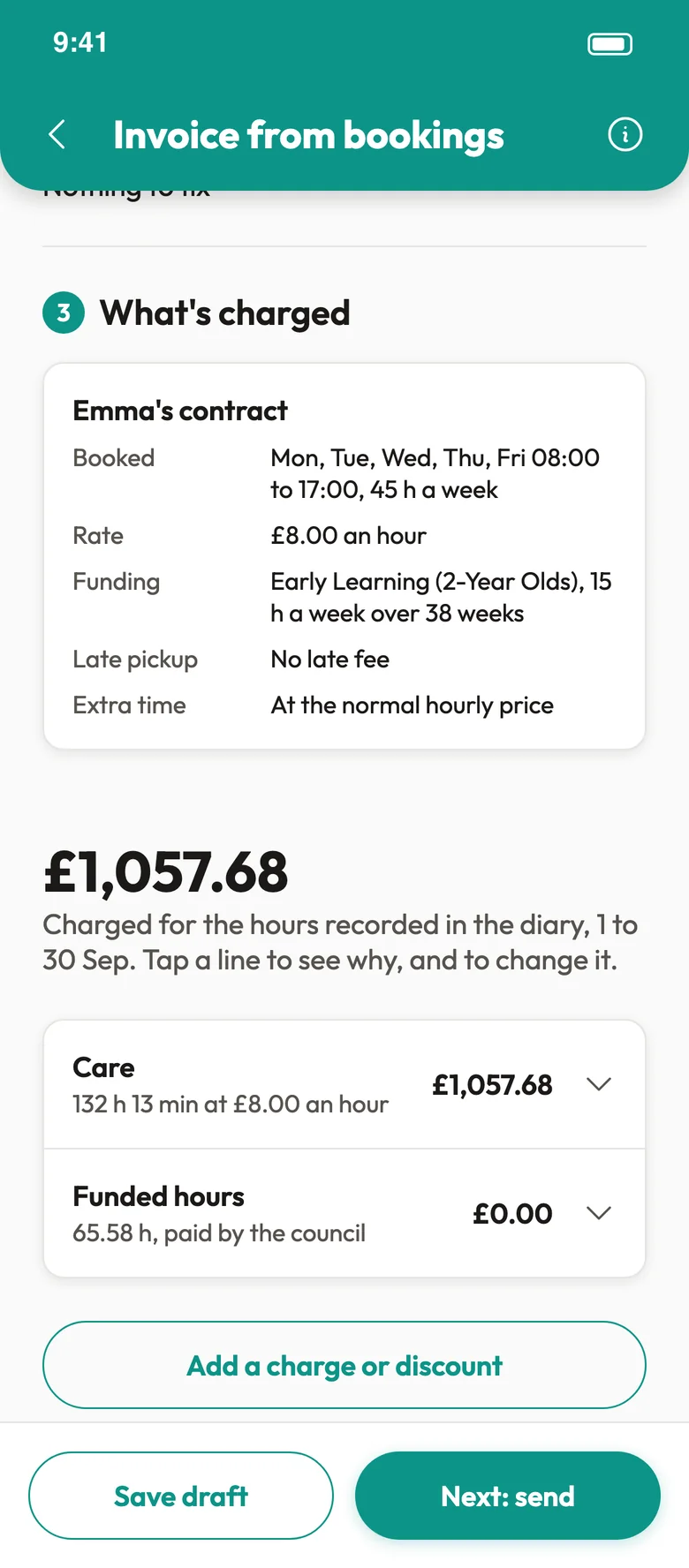
INVOICE: A compliant itemised invoice
The Golden Rule: The £0.00 Requirement
Government-funded early education hours must appear at £0.00 on the parent's invoice. Charging any fee to cover the gap between the funding rate and your private rate is non-compliant.
The Compliance Checklist
| WHAT MUST BE ON THE INVOICE | WHAT MUST NOT BE ON THE INVOICE |
|---|---|
| Funded hours as a separate line at £0.00. | A single "Monthly Fee" with no breakdown. |
| Additional private hours at your agreed rate. | Funding shown as a "Discount" or reduction. |
| Itemised voluntary consumables (e.g. Meals). | Compulsory fees for meals or nappies. |
| Your full provider details. | Fees of any description applied to funded hours. |
⚠️The Rounding Trap
Precision Math. Never round stretched hours (e.g. 22.35 or 21.92) down to whole numbers. Rounding down short-changes the child's funded hours. Check your exact weekly numbers using our stretched funding calculator.
Submitting Your LA Claim
Claims to your Local Authority are required each funding period. Follow this workflow to generate a compliant invoice and export your claim data.
- Log funded hours in the child's contract.
- Create the month's invoice from the Finance tab. Invoices are monthly; funded hours are worked out week by week.
- KinderStart separates private and funded line items automatically.
- Open Tools → Funding Tracker, choose the Allocation tab and tap Export CSV for your LA claim.
CSV Export
 CSV Export
LA Claim Format. The CSV lists each child's booked, funded and unfunded hours, funding scheme, LA rate and claim total. There is no national template, so check your LA's portal for the columns it needs before uploading.
Managing the "Split Week"
When a week spans two months (e.g. Monday 30 March to Sunday 5 April), your weekly funding cap still applies across both months.
- The Look-Back: KinderStart's invoicing engine checks the previous month's sessions. This ensures the child's weekly cap (e.g. 23.75 hours) is not exceeded across the split.
- Automatic Overflow: KinderStart shifts any hours exceeding the cap in the new month to your private rate. Your revenue is protected without manual calculation of overlap hours.
Reconciling "Banked Hours"
Hours are banked only when you couldn't deliver funded care: your own illness, or a bank holiday closure your LA still pays for. A child's own absence uses their funded hours and is not banked.
- Usage: Offer banked hours back to the family, for example to cover extra sessions later in the term.
- Audit Trail: The Balances tab in Tools → Funding Tracker keeps a running ledger of each child's hours attended and banked for the term.
The Grace Period
Eligibility Loss. If a parent loses their eligibility code, funding does not stop instantly. The DfE operates an automatic Grace Period tied to term dates. Record the code's expiry and grace period dates on the child's contract, and KinderStart warns you in the daily diary before the child's funding reverts to private rates.
Pro-Tips for Inspectors
During an inspection, Ofsted will look for transparency.
- Voluntary Consumables: Ensure your contract states that parents can opt out of meals and provide their own.
- The £0.00 Rule: Show the inspector a sample invoice — the £0.00 line item is the fastest proof of financial compliance.
✅Automated Accuracy
The Invoicing Engine. Link your Contract to your Attendance Register and KinderStart generates itemised, compliant invoices in seconds. No manual spreadsheets, and 100% audit-ready output.


Generate compliant invoices in seconds
KinderStart automates £0.00 funded lines and transparent consumable charges. MTD-compliant, ready for 2026.
Cancel in the app before day 7 and you pay nothing.
Where we mention other providers, check each provider's own website for its current features and prices. Product names are trademarks of their owners.